



How to Build a Good Twitter Profile That Actually Grows Your Audience (Step-by-Step Guide)
Why Your Twitter Profile is Failing (And How to Fix It)
You’ve spent hours crafting tweets, adding hashtags, and retweeting influencers—but your follower count isn’t moving. Your profile? Static. Your engagement? Minimal. The frustration is real.
Here’s the truth: Most Twitter profiles fail not because of content, but because of poor setup, weak branding, and no strategy.
The good news? You can fix this—fast. In this guide, we’ll walk through exactly how to build a Twitter profile that works. By the end, you’ll understand:
How to optimize your handle, bio, and visuals for maximum impact.
How to add keywords, hashtags, and SEO for discoverability.
How to automate growth, engagement, and content safely using JarveePro.
How to convert followers into customers, leads, or brand advocates.
We’re not just talking theory. This is step-by-step, insight-driven, real-world guidance.
Part 1: The Foundation – Your Handle & Display Name
Why it matters: Your handle and display name are the first thing users see. If it’s confusing or unsearchable, you’re invisible.
1.1 Pick a Handle That Works
Keep it short and memorable (e.g.,
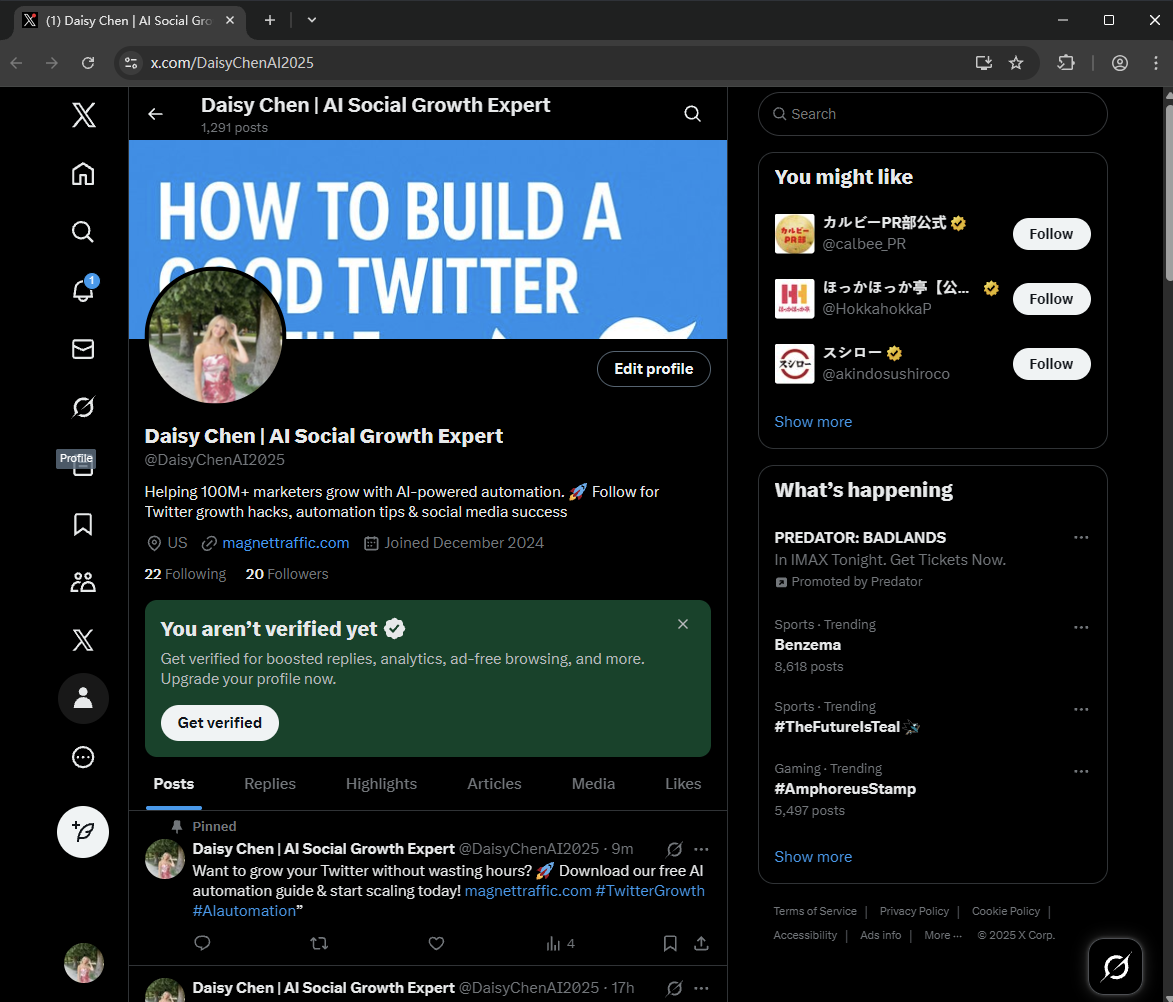
@DaisyChenAI2025instead of@Daisy1234_AIMarketing).Include your niche or keyword if possible (“AI”, “Marketing”, “SocialGrowth”).
Avoid numbers, underscores, or random characters—they hurt recall and SEO.
Pro Tip: Use a handle that is consistent across platforms for brand recognition.
1.2 Optimize Your Display Name
Include keywords in your name for search discoverability:
Daisy Chen | AI Marketing Expert.Make it informative and credible. Users should know instantly what you do.
Visual Example:
Display Name: Daisy Chen | AI Social Growth Expert
Handle: @DaisyChenAI2025
This tells followers immediately: “You’re in the right place for AI-driven social media growth.”
Part 2: Craft a Bio That Converts
Your bio is the profile’s elevator pitch. Most people make it bland. Stop that.
2.1 Structure Your Bio
What you do: AI automation, Twitter growth, influencer marketing.
Who you help: marketers, entrepreneurs, small businesses.
Why follow you: results, expertise, or insider insights.
Optional personality touch: humor, emojis, or storytelling.
Call-to-action (CTA): link to website, landing page, or free resource.
Example Bio:
Helping 100M+ marketers grow with AI-powered automation. 🚀 Follow for Twitter growth hacks, automation tips & social media success
2.2 Keywords Are Your Secret Weapon
Include 2–3 relevant keywords naturally in your bio (e.g., Twitter growth, AI marketing, social media automation). These keywords help your profile appear in searches and improve discoverability.
Part 3: Visual Branding – Profile Picture & Banner
Why visuals matter: Humans are visual. Your profile picture and banner are your first impression, more than your bio.
3.1 Profile Picture
High-quality headshot if personal brand.
Logo if representing a business.
Consistency across platforms builds recognition.
3.2 Banner Image
Highlight value proposition or achievements (e.g., “Helping 100M marketers automate social media”).
Include CTA, hashtags, or website link if appropriate.
Ensure mobile-friendly cropping: Twitter crops banners on phones.
Pro Tip: Rotate banners for campaigns, product launches, or seasonal updates to stay fresh.
Part 4: Pinned Tweet – Your Social Proof & Hook
Your pinned tweet is the first content visitors see after your bio. It sets the tone.
4.1 What to Pin
Your best-performing tweet (highest engagement).
A lead magnet or free guide to drive clicks.
Promotional content if you’re selling products/services.
4.2 How to Optimize Pinned Tweets
Include keywords & hashtags relevant to your niche.
Add visuals, GIFs, or videos to grab attention.
Refresh every 4–6 weeks to highlight current priorities.
Example Pinned Tweet:
“Want to grow your Twitter without wasting hours? 🚀 Download our free AI automation guide & start scaling today! [link] #TwitterGrowth #AIautomation”
Part 5: SEO Optimization for Twitter
Twitter is searchable, not just social. Optimizing for SEO boosts discoverability on both Twitter and Google.
5.1 On-Profile SEO
Handle + Display Name + Bio = search keywords
Add location or niche keywords for localized searches
5.2 Tweet-Level SEO
Hashtags: 2–3 relevant hashtags per tweet for discoverability
Keyword-rich tweets for better search ranking
Geo-tags for location-targeted posts
Pro Tip: Track keyword performance using Twitter analytics or JarveePro’s built-in reporting tools.
Part 6: Content Strategy – Consistency and Value
Even the best profile fails without consistent content.
6.1 Posting Frequency
1–3 tweets/day for personal accounts
3–10 tweets/day for brands with multiple accounts
6.2 Content Mix
Educational tips (AI marketing, Twitter hacks)
Personal insights or behind-the-scenes
Retweets + curated content with commentary
Visual content: images, videos, GIFs, charts
JarveePro Tip: Use automation for scheduling posts, ensuring consistent publishing across time zones, while keeping engagement authentic.
Part 7: Engagement & Growth Strategies
Twitter is a conversation, not a broadcast.
7.1 Engagement Tactics
Respond to mentions, DMs, and replies promptly
Engage with influencers in your niche
Retweet and comment strategically, not mindlessly
7.2 Hashtag & Keyword Targeting
Use trending hashtags relevant to your niche
Geo-specific hashtags to target local followers
7.3 Twitter Lists
Organize competitors, industry leaders, and active users
Monitor trends and engagement opportunities
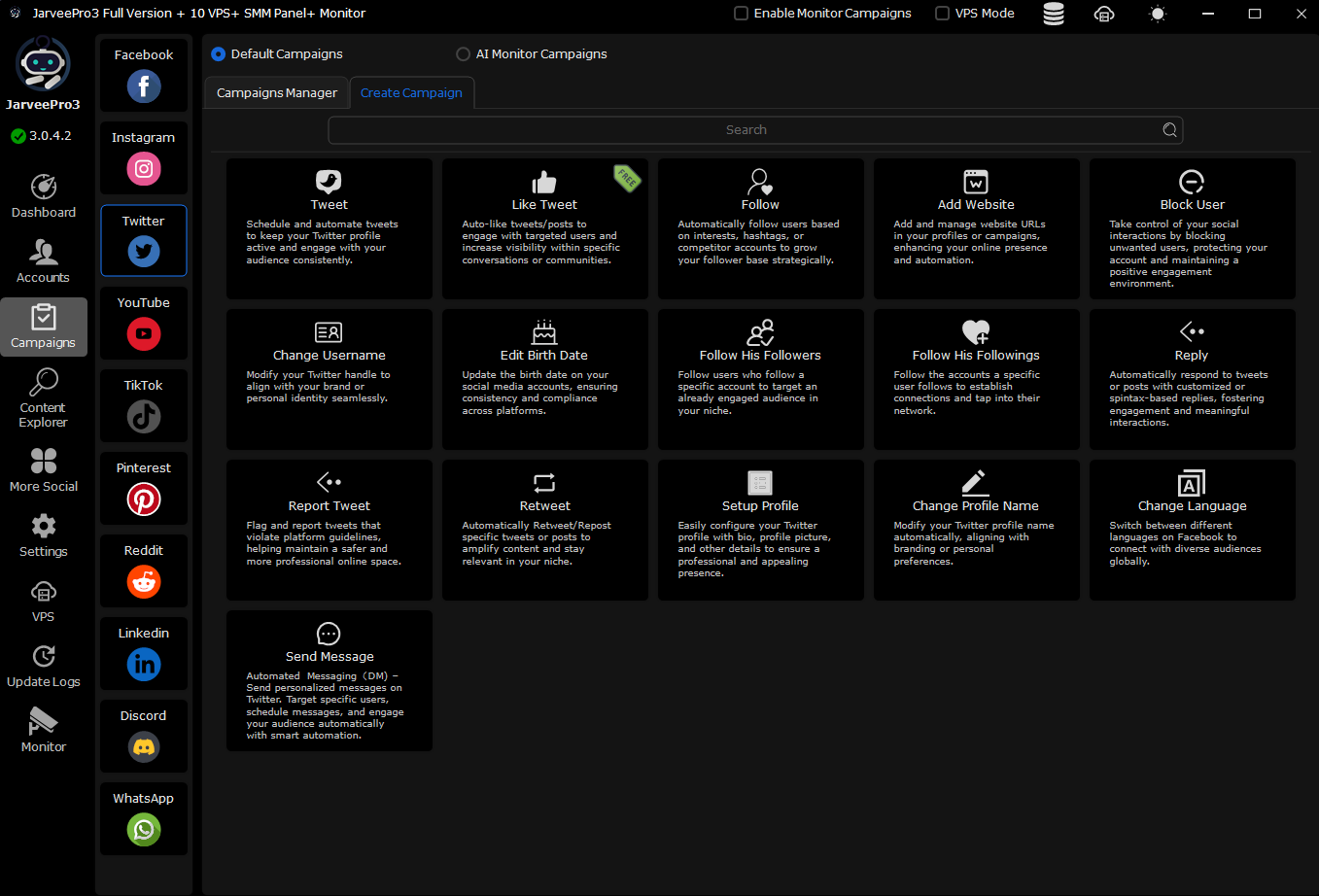
JarveePro Integration: Automate following, liking, and retweeting safely using filters, proxies, and account groups to avoid bans while scaling engagement.
Part 8: Advanced Tips – AI & Geo-Targeting
8.1 AI Content Generation
JarveePro can draft tweets, DMs, comments using AI
Allows personalized engagement at scale without sounding robotic
8.2 Geo-Targeted Campaigns
Assign proxies per region for localized posting
Use hashtags, keywords, and timing for regional engagement
Monitor analytics per region to refine campaigns
8.3 Cross-Promotion
Link Twitter to Instagram, TikTok, YouTube, LinkedIn
Funnel audiences across platforms for maximum reach
Part 9: Analytics & Iteration
Monitor follower growth, engagement, and reach
Identify top-performing content types
Adjust posting times, hashtags, and content based on insights
JarveePro Dashboard:
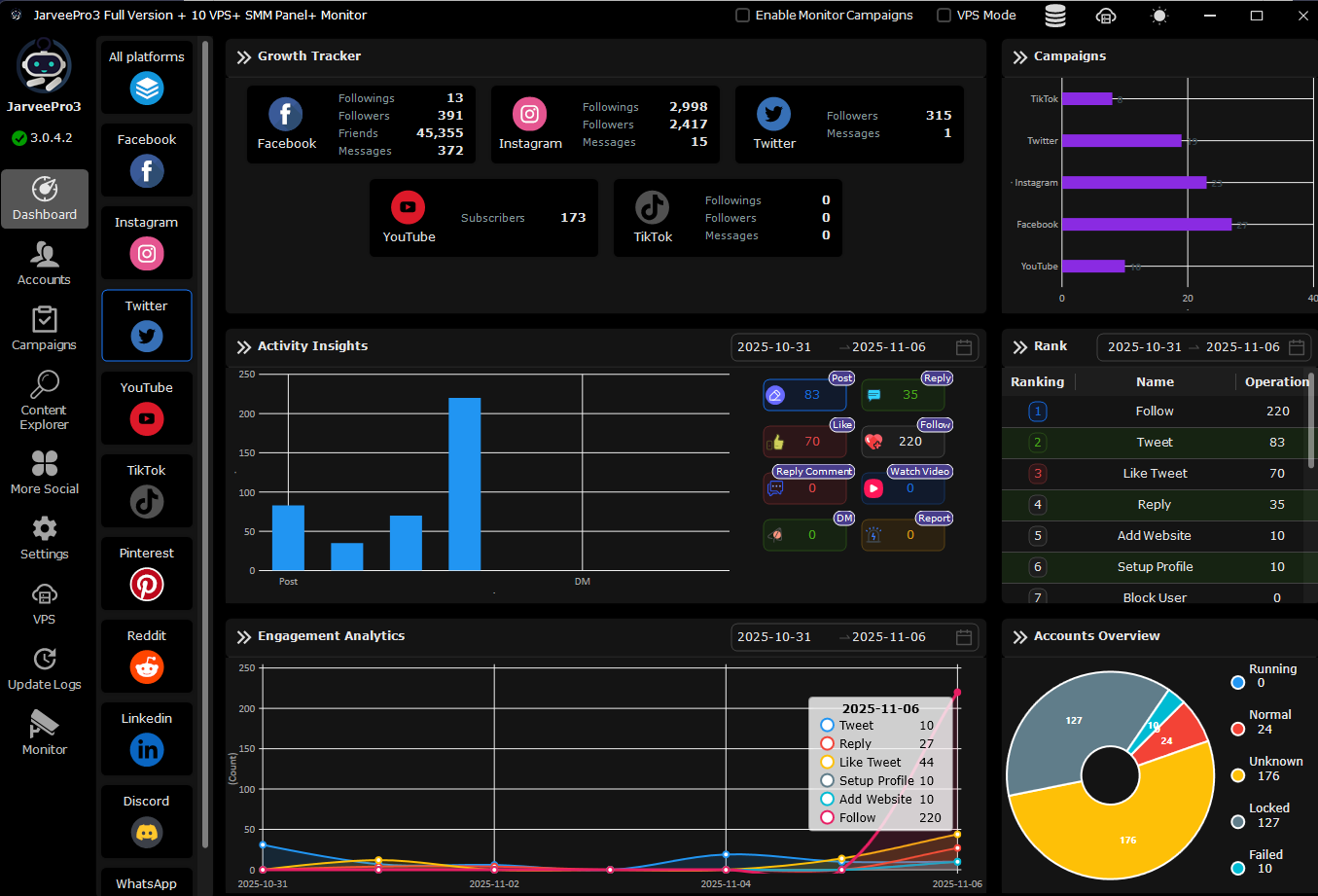
Visual analytics for campaigns
Multi-account performance comparison
Region-specific engagement tracking
Pro Tip: Use data to double down on what works, stop wasting effort on underperforming tactics.
Part 10: Case Studies & Real-World Results
Case Study 1 – Influencer Growth
Profile: AI Marketing Consultant
Strategy: Bio + handle optimization, pinned guide, AI-generated tweets
Result: 10,000 new followers in 3 months, 25% increase in engagement
Case Study 2 – Multi-Region Brand
Profile: E-commerce brand with regional accounts
Strategy: Geo-targeted posts + JarveePro automation + local hashtags
Result: 40% growth in regional engagement, 30% increase in conversions
Part 11: Step-by-Step JarveePro Integration
Create account groups for region/language
Assign proxies for localized IPs
Schedule AI-generated tweets with content mix
Automate engagement (likes, follows, retweets) safely
Track analytics and iterate
This allows high-volume, geo-optimized, keyword-rich, engagement-driven growth—all while staying compliant and avoiding bans.
Summary – The Ultimate Twitter Profile Checklist
Profile:
Optimized handle & display name ✅
Keyword-rich bio with CTA ✅
Professional profile picture & banner ✅
Content:
Consistent, high-value posting ✅
Pinned tweet with social proof & CTA ✅
Hashtag & keyword optimization ✅
Growth:
Strategic engagement ✅
Geo-targeting & AI automation with JarveePro ✅
Analytics-driven iteration ✅
Outcome: Followers grow, engagement spikes, and your profile becomes a magnet for your target audience.